[blog]_[ Performance Max - Everything You Need To Know]_[Blog Picture]

Performance Max – Everything You Need To Know

So by now you’ve probably heard about the introduction of Performance Max & the sunsetting on Smart Shopping. Some may be worried about what this means for their campaigns, as we know Google’s changes aren’t always the best in the eyes of an advertiser. However, I’m here to run through what Performance Max is, how it works & how you can get the best out of it. 

What is Performance Max?

Don’t be put off by the name – this isn’t a completely new product. It still acts in the same way as Smart Shopping but takes machine learning and visibility to the next level, incorporating more channels than ever before. This means that advertisers can now reach more customers from just one campaign, letting Google’s machine learning & automation optimise bids & placements that are based around your budgets, goals & conversions. Performance Max is essentially Smart Shopping Plus.

How does it work?

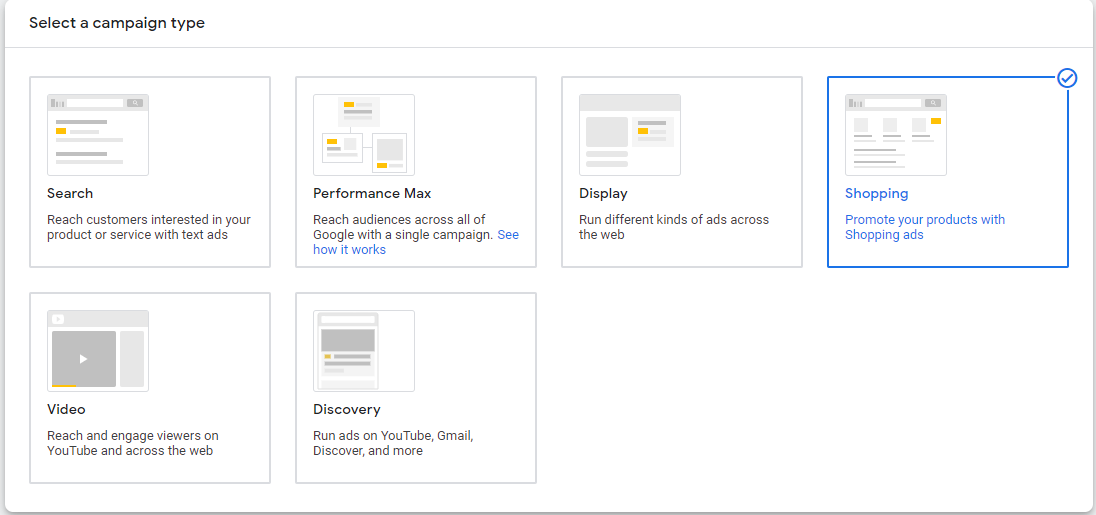
Performance Max is a goal based campaign type that allows users to access a wider range of the Google Network including:

  • • YouTube
  • • Display
  •  Search
  •  Discover
  •  Gmail
  •  Maps
[blog]_[Performance Max - Everything You Need To Know]_[blog picture]
Source: Google

Building on the “Standard Shopping” & “Display Remarketing” combination of Smart Shopping, Performance Max also brings new opportunities by adding “Dynamic Search Ads” to the mix. This complements existing Search Keywords within the account but acts as a catch-all to ensure that advertisers are not missing out on any sales.

As I said before, this is a goal based campaign & in honour of its name, the main focus of these campaigns is to drive performance based on the specific conversion goals that you set. 

How do I set a Performance Max campaign up?

Google automates the targeting of Performance Max campaigns based on the information that you provide. Primarily, this is the budget & the campaign goal which gives the constraints to which the campaign needs to adhere to. Performance Max uses asset groups which are a collection of creatives centred on a theme or related to a target audience. Advertisers also need to provide the following creative assets which consist of:

  • • Final URL
  • • Up to 15 Images
  • • Up to 5 Logos
  • • Up to 5 Videos (Google has autocreated videos if you don’t provide any but honestly, if you have the resource, it is definitely worth creating these yourself as the auto-created ones aren’t the best)
  • • Up to 5 Headlines
  • • Up to 5 Long Headlines
  • • Up to 5 Descriptions
  • • Call To Action
  • • Business Name

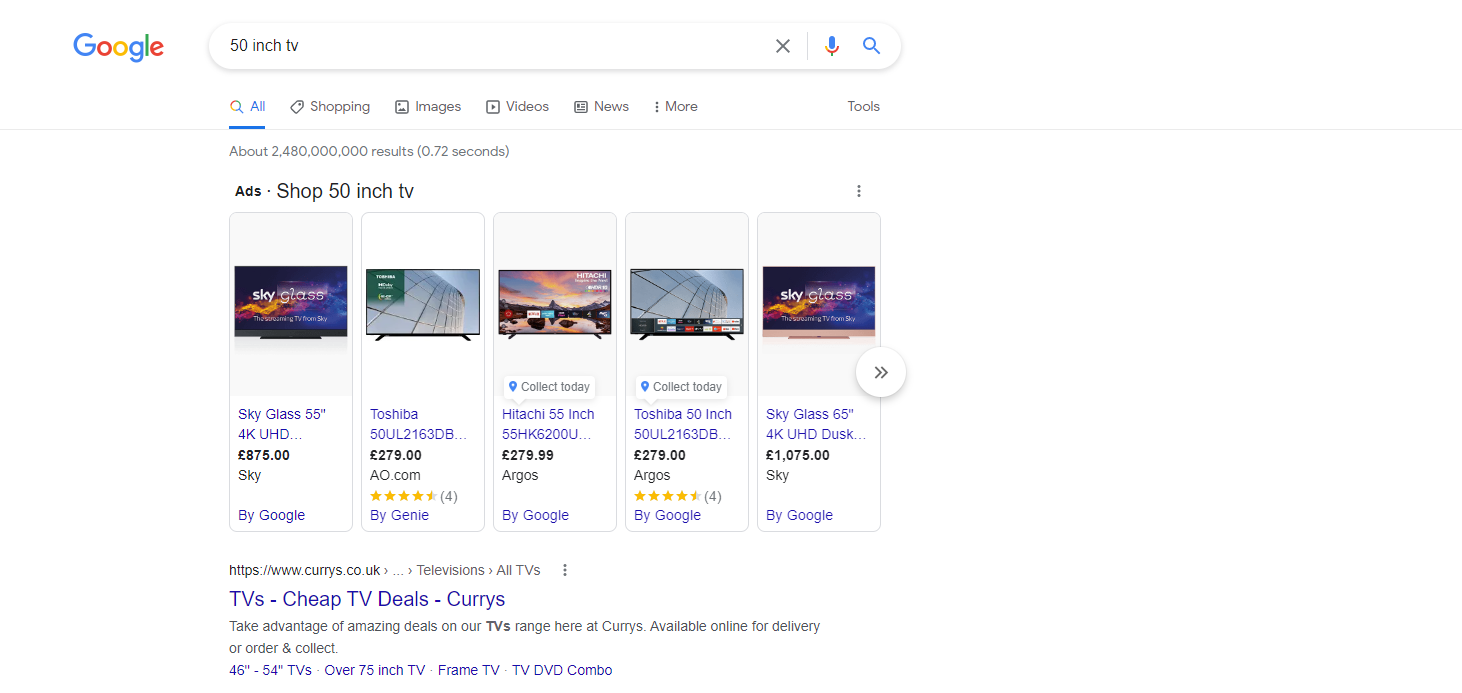
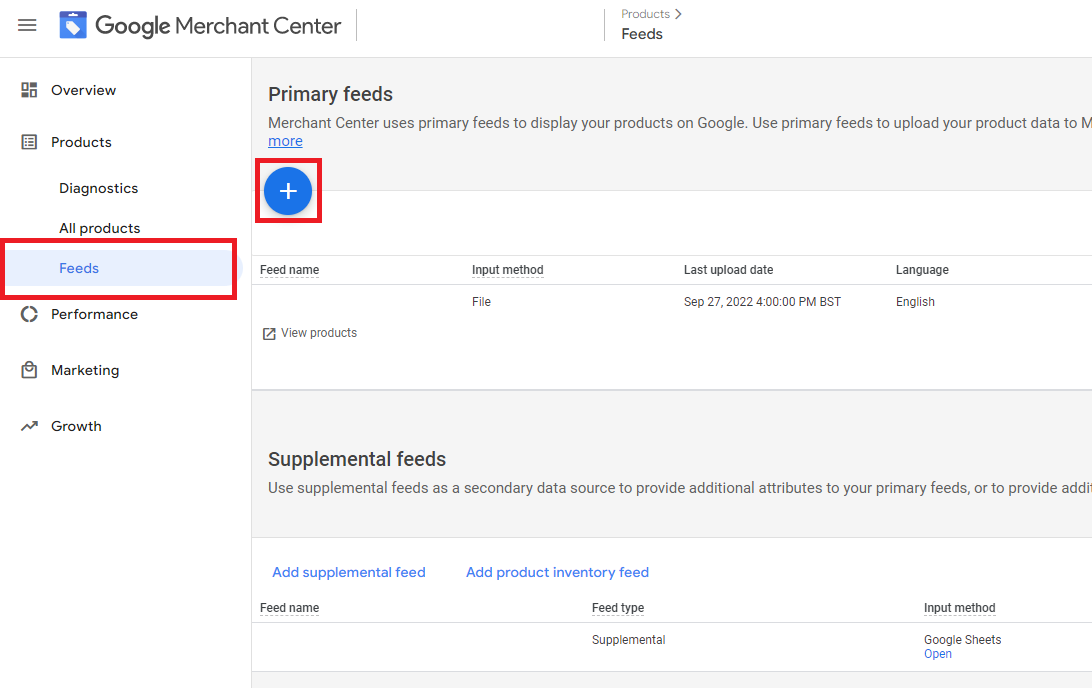
However, new updates from Google’s Ads Liaison, Ginny Marvin, confirmed that if you connect your Google Merchant Feed but don’t provide any other assets, the campaign will only serve Shopping Ads. So if this is your primary focus & you don’t want to go back to Standard Shopping this could be the answer.

You can also add audience signals to hit the ground running & feed data into the algorithm – this will also be used to continuously inform the algorithms throughout the lifecycle of the campaign. 

Another important upgrade to Performance Max builds on the “New Customer Acquisition” feature of Smart Shopping where you could value new customers higher than returning. In PMax, you can now bid more for new customers or bid only for new customers. This could be a really interesting growth tool for businesses to expand their current customer base more specifically than ever before.

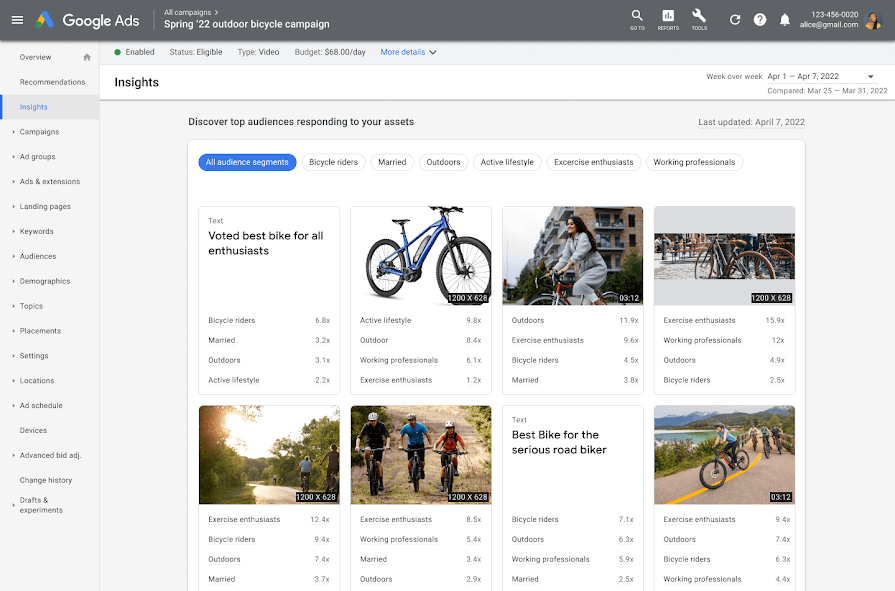
Performance Max also builds on the “Insights” tab of Smart Shopping, taking this further to highlight search themes that are driving conversions – this will give better insights into the trends & patterns within the market. Alongside this, it will also showcase what types of audiences are engaging with the different assets that the ads are showing. This will help you to understand how users are interacting with the ads and you can then use this information to improve & tailor your ads more effectively.

Source: Google

Performance Max continues the drawbacks of Smart Shopping too, with a lack of visibility over channel-specific performance & lack of manual optimisation; especially around the addition of negative keywords & placements. However, Google representatives have explained that this lack of data is to ensure that advertisers are allowing the algorithms to do their job properly. Giving these insights may enable human bias to pull away from certain areas within the campaign, be that channels or placements, but users should be reassured that the campaign’s sole focus is on performance. Basically, the algorithms will be taking into account any areas that aren’t delivering the required results & optimising towards the ones that do. Makes sense when you think of it like that huh?

So what do I do now?

Smart Shopping is being sunsetted in September 2022, therefore you have a bit of time to experiment & see what works for you. My guess would be to wait until the one-click migration tool is live in May. This will allow you to automatically migrate your Smart Shopping campaigns into Performance Max, meaning that there is no potential downtime of the campaigns. Doing it this way also means that Performance Max will be able to use all the historical data from the Smart Shopping campaign resulting in a much shorter learning period. This seems the safest option in both the transition & the speed of performance off the back of the migration. You can of course start testing now, however, this means that you will need to set the campaigns up from scratch which could be a lot more time consuming & leaves more room for human error.

[blog]_[Forecasting PPC Growth With Help From Google Data Studio]_[Blog Picture]

Forecasting PPC Growth With Help From Google Data Studio

PPC, as one of the more measurable ways of digital marketing, provides a great platform for people to understand exactly how much they are going to spend. Within reason, and by utilising data, it gives them an understanding of the type of return they can expect, as well as any growth opportunities. This makes it highly appealing to people who are looking for a directly measurable approach

As someone who studied Specialist Mathematics, I’m not afraid of some number crunching, or longer more complicated equations. However, after ploughing through endless spreadsheets I was convinced there must have been an easier way to do this – enter Google Data Studio. Now don’t get me wrong, there’s still quite a bit of maths involved here, but, the data visualisation beauty of Google Data Studio means that trying to explain it to clients just became a whole lot easier. By combining the equations & letting Google do the working out for you, you can not only leverage the data that’s available, you can also present it in a way which is pleasing to all key stakeholders.

Now I’m aware there are many different ways to do this & there are also a number of tools within the market that do this for you. So, today I will share with you how I approach PPC forecasting when it comes to growth &, also, starting to understand the type of return you can expect on both ad spend and leads when launching campaigns.

I want to caveat that there are two different ways to tackle this & today I will only be looking at growth forecasting – that is forecasting when you have pre-existing data that you can work with. If you are looking to forecast from scratch then that is a whole different ballgame (& a whole different blog)! For the purpose of today we will be focusing on utilising data that you already have to predict growth.


Forecasting – Search Growth

If you have an existing Search Campaign & you’re looking to grow your business & drive new leads, chances are that you will have undertaken some growth forecasting. This can come in a number of different formats, from Google’s own tools, Excel spreadsheets or through in-house technologies. For the example below I’m going to show you how we can do that with Google Data Studio (with the help of Google’s “Opportunity Lost” template).

You can download Google’s “Opportunity Lost” template within the Data Studio templates &, once you have it, you will see that it’s a 13 slide template enabling you to see where the opportunity is within your Google Search & Display campaigns. (Note: I haven’t yet found one for Shopping but I am in the process of looking to create one).

For the purpose of this blog we are going to be focusing on Slide 3 (Search Bid Lost Overview) & Slide 5 (Display Bid Lost Overview). Let’s start with Slide 3 (Search Bid Lost Overview).

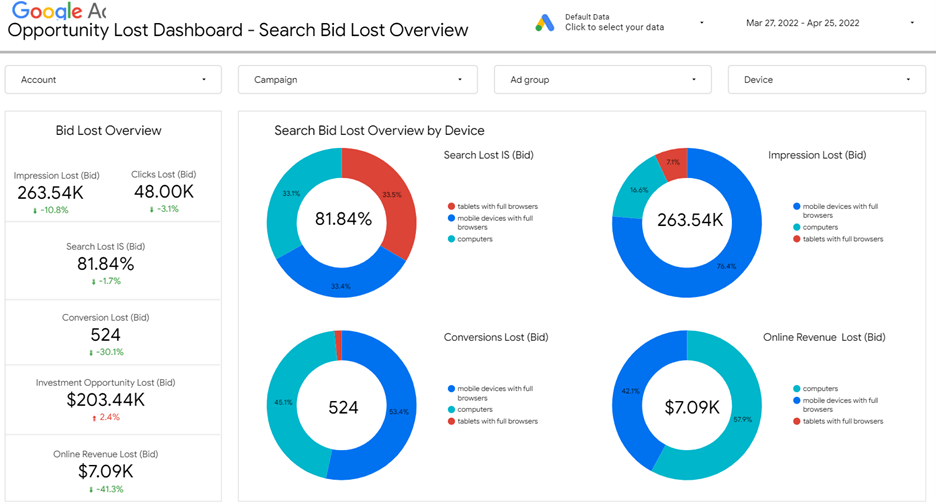
When you first load up the presentation it will look something like this:

Now, while this dashboard in itself is incredibly useful & contains a lot of valuable information, when it came to forecasting I wanted to neaten it up to make for a more digestible board, which I could quickly & easily pull out in client presentations. Also, in the example below, as the client didn’t have an Ecommerce arm I removed all reference to Revenue, preferring to focus on the three main areas:

  • Impressions Lost
  • Impression Share Lost
  • Conversions Lost

By focusing on the above I was able to simplify the dashboard & also tailor it so that I could break it down by different dimensions, including “Day Of The Week” & “Device” to help with my optimisations.

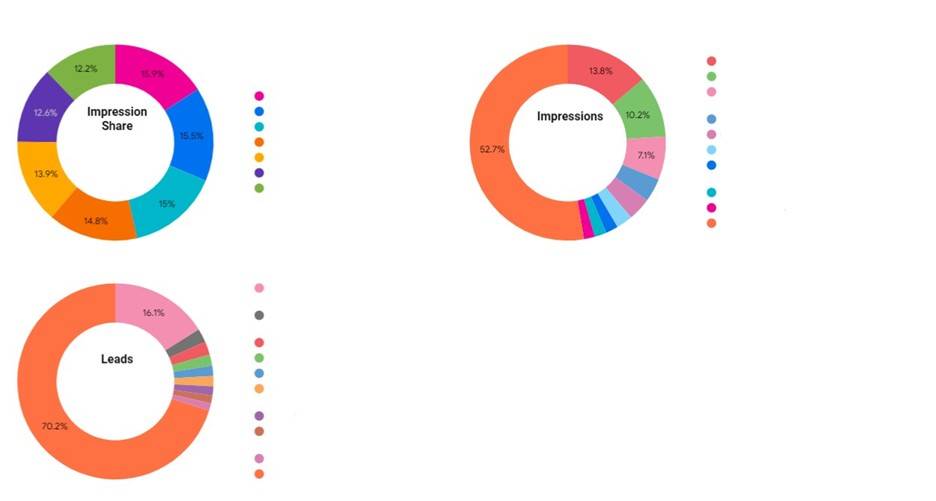
So, after a little work I adapted the Data Studio to look like the below (please note I’ve removed the client data hence the white gaps):

The beauty of this style of diagram is that not only does it give us absolute figures (in the middle) where we can understand what that growth looks like, it also allows us to segment by a dimension to help us identify where the real growth comes from. In the example above I segmented the Impression Share column by “Day Of The Week” so I could understand on which days I needed to bid more & in the Impressions & Leads columns I segmented by “Campaign” so I could understand which Campaigns had the biggest room to grow & improve. You can also segment by Device & other dimensions to really understand where your opportunity is & to drive the growth in the most efficient manner.

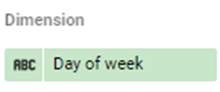
To do the above you simply need to change the “Dimension” section of the Google Data Studio report to “Day of week” or “Campaign” or “Device” depending on what you are trying to analyse.

Now, in terms of the calculations from Google’s perspective these are already input into the Data Studio, but for an understanding of how we can change these to suit different dimensions I’ve listed them here:

For Impression Share – Search Lost IS (Rank)

For Impressions – Impressions / Search Impr. share * Search Lost IS (rank)

For Leads – ((Impressions / Search Impr. share * Search Lost IS (rank))* CTR) * (Conversions / Clicks)

By using the three equations above we are able to use simple metrics within the account to estimate growth capabilities based on key data such as Conversions etc… As you can see from the top sheet you then have the option to choose between specific campaigns, and drilling down on the details here will get a better analysis of the campaign.


Changing Between Impression Share, Top Impression Share & Abs. Top Impression Share

Now in some situations you may just want to know the Impression Share that is available to you & how much your clients can grow, but in others you may want to know what more is available to you. That’s where editing the equations to incorporate Top Impression Share & Abs comes in. Top Impression Share can really help.

Let’s take a look at the equation for Leads:

If we change: ((Impressions / Search Impr. share * Search Lost IS (rank)) * CTR) * (Conversions / Clicks)

To: ((Impressions / Search Impr. share * Search Lost Top IS (rank)) * CTR) * (Conversions / Clicks)

We are now forecasting the potential if each ad is in the top positions (i.e. above the Organic search rankings), as opposed to if the ad just has the opportunity to show 100% of the time. By doing this we are able to identify not only visibility growth, but also growth patterns for higher ad positions & also top ad positions using Search Abs. Top IS (rank).

By utilising the above approach you can get a good understanding of how your Search campaigns are currently performing & where the potential growth areas might be. This is a great way to plan your upcoming campaigns.

Forecasting – Display Growth

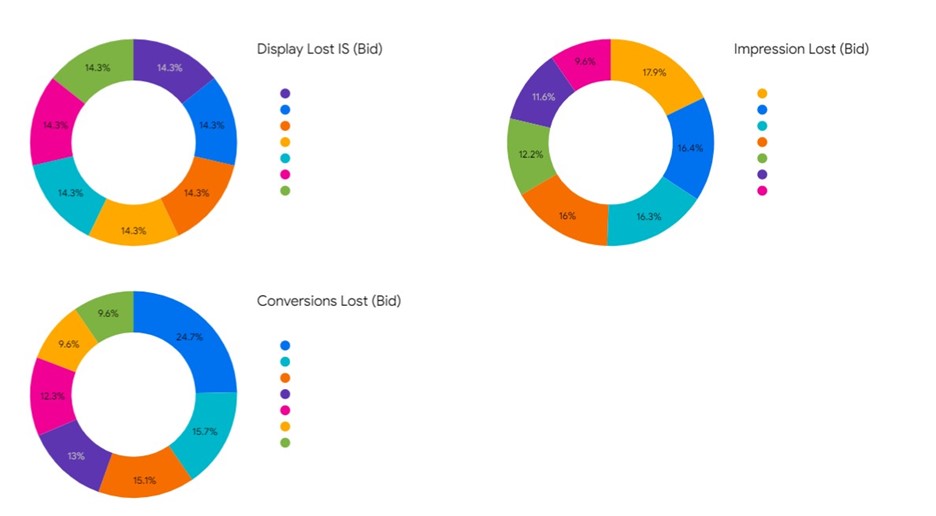
Now that we’ve looked at how to forecast Search growth, we can roll out the same principle to forecast Display growth – although generally with much bigger metrics. I’ve created a similar dashboard here for Display, which you can view below, & focused solely on any campaigns which sit on the Display Network. What’s most interesting to note here is that dimensions such as “Day of the week” & “Device” are more pronounced. This is a much easier way to digest & get that data than trying to source it manually.

The dashboard above works in exactly the same way as the Search dashboard, except that it displays content related only to the Display campaigns. The equations work in a similar manner other than they use Display Lost IS as opposed to the search variation. All in all it’s a great way to see the overall performance of the Display Campaign & identify any areas of opportunity.

Conclusion

If you’re looking for a way to effectively forecast then there are a whole host of tools out there that you can use. However, if you are looking for a quick way to utilise the power of Google Data Studio for PPC forecasting then the ideas above should help you on your journey to find out the PPC potential of your campaigns & your website!

[blog]_[How to spend less time optimising and more time strategising with Scripts]_[Blog Picture]

How to spend less time optimising and more time strategising with Scripts

Paid Media Manager, Anna Simpson, explains how Scripts gave her back precious time and helped her optimise client campaigns

Why strategy is important

We all know that optimising PPC accounts can be extremely time consuming. Tasks like negative keywords, adjusting bids and essentially doing everything that we can to ensure our campaigns are as effective as possible can use up a lot of hours. These long but crucial tasks can sometimes take away from what really matters and what can really make a difference in client accounts – strategy planning. Having a few extra hours to sit down and really look at an account, analyse the role of PPC and align this with the ultimate business goals of your client can make all the difference. Taking a step back and thinking outside the box is an important tool in understanding how to really drive client performance. Sometimes this can be overlooked due to the day-to-day optimisations and not having any spare time to do this essential leg work. This is where I found myself; getting so bogged down in the nitty gritty, I was missing countless opportunities to grow. And then scripts became my saviour.

Shopping Campaigns

I knew years ago that Standard Shopping campaigns in particular, can burn through budgets if optimisations aren’t made regularly. This has long been  a pet hate of mine; there wasn’t an automated way to bulk negative keywords UNLESS the search term included specific keywords that I wanted to keep. Fast forward a few years and I finally found a script that does exactly that (HURRAY!!). The script works by utilising a Google Sheet; you input the campaign name and ad group, and specify which keywords you don’t want to exclude. For example, if I had a Shopping Campaign selling bikes but I was getting a lot of irrelevant search terms for other types of products, I could use this script to add “bike” as a positive keyword. This would then tell the script to exclude any search terms that don’t have the word “bike” in it. Honestly, this script is amazing for anyone with multiple different shopping campaigns; you can be incredibly granular about the keywords that you want to keep and let the script do the rest!

Exact Match Keywords

The second script I’m loving is the Exact Match Close Variant Exclusion. Over the years Google has tried to hide data and steer away from advertisers having as much control as they may have had in the past. A great example of this is the “close variant” search terms that can appear in Exact Match campaigns. These can vary quite dramatically from the original keyword, sometimes not even being relevant at all. In competitive industries where CPC’s can be extremely high, it’s crucial to remain in control over the search terms that ads are appearing for – that’s where this script comes in handy. It will automatically exclude close variant keywords for exact match keywords. There is also an element of control here for quality checks with two variables that can be changed in this script: “Words In Common” and “Edit Distance”. If you set “Words In Common” to true, this tells the script to keep a search term if the keywords and search queries contain any of the same words and make a negative if not. “Edit Distance” allows you to choose a number of characters that can be different from the keyword and tells the script to still keep these search terms and not exclude them. This can be particularly helpful for keeping search terms that just have spelling errors. I like to run this on an hourly basis just to make sure my campaigns are as optimised as possible and not let any sneaky search terms rack up an enormous spend!

Ah, the weather!

Last but not least, the Weather Script. This is beneficial for a lot of our clients, both ecommerce and lead generation, but can be useful in a number of different ways. The script works by analysing weather data from the Met Office and adjusting bids based on the temperature, precipitation and wind that day in certain areas. This can be incredibly helpful for clients that sell well when the weather is sunny, and also for lead generation clients who slow down on days when people are less likely to be sat at computers. This allows highly granular optimisations for external factors that can be ever-changing (especially here in the UK where it can be sunny in the morning and torrential rain by 1pm *eyeroll*). 

So there we have it. These are just 3 of the scripts that help to free up some of my time and allow me to focus on a more holistic view and approach to our PPC strategy. If you would like a copy of these scripts or have any questions on how to implement them, then please feel free to drop me an email.