We were absolutely delighted to take home TWO awards at the European Search Awards in Lisbon last night! Hosted at the beautiful Patio De Gale it was great to see everyone come together in a celebration of search across Europe!
On the night we took home:
📣 Best Small Integrated Agency 📣 Best Use Of PR In Search
Absolutely delighted to take home two awards to showcase the great year that Cedarwood has had and was lovely to catch up with other agencies & brands during the night!
On-page SEO, sometimes referred to as on-site SEO, refers to the practice of optimising your website in order for it to improve your user’s experience, rank higher in the SERPs and to gain more organic traffic. On-page SEO can include many different aspects including updating content, updating the structure of your page, using internal links and many more. When you are optimising your on-page SEO, you are aiming to improve the user experience by providing valuable and relevant content to your visitors, in addition to improving the page’s relevance and salience and showcasing your expertise on a given topic. By improving your on-page SEO, it will help to improve your visibility and traffic. In this blog, we will be discussing tips that you can use to improve your on-page SEO.
What Is On-Page SEO?
On-page SEO is an extremely important aspect of search engine optimisation and it involves optimising your web pages in order to rank higher in the search engine results pages (SERPs) so that you can attract more traffic to your website. Unlike off-page SEO, which involves external factors such as gaining backlinks into your website, on-page SEO is about making improvements directly on your website. There are many elements of on-page SEO that can help you to improve your rankings by creating a better user experience.
Why Is On-Page SEO So Important?
Improving your on-page SEO is incredibly important because it will help to improve search visibility and increase the amount of traffic to your website. According to a study by Backlinko who analysed the click through rate data across 1,312,881 pages and 12,166,560 search queries, it found that the website in position 1 in Google’s organic search results has an average click through rate of 27.6%, this was the highest click through rate by far, a sharp drop off then started on the 2nd page of the results.
This shows that being on the first page of the SERPs will help you to gain more traffic. Another statistic that further implies this, is that only 0.63% of Google searchers clicked on a link from the second page of the SERPs.
The figures and statistics above show the importance of improving your website’s rankings, and improving your on-page SEO will play a key role in helping Google to recognise what your website is about and the value of it, therefore putting you in a better position to rank. So, now that we know the importance of improving on-page SEO for your website, let’s dive into how you can do this.
Review the salience and relevance of the content on your website
In the world of SEO, the content that is on your website is extremely important. The content is what drives traffic to your website, what engages your users and what can also convert users into customers. It is therefore essential to regularly review the salience and relevance of the content on your website.
Salience refers to how relevant the content on your website is, relating to your target audience. If the content on your website is not relevant to your users, they will be unlikely to engage with it or even visit your website in the first place. It is therefore important to regularly ensure that the salience of your content is to a high level to ensure you are providing users with the most relevant helpful content. It is also important to make sure that your content aligns with what users are searching for because, if your content is not relevant to keywords that users are searching for in Google, it is unlikely that your website will appear in the SERPs, therefore meaning that you could be missing out on a significant amount of organic traffic.
By regularly reviewing the salience and relevance of the content on your website, you will be able to identify gaps that you have within your content and then make any necessary changes and amendments. By updating your content, you will be able to improve the salience of your content and make it more useful to users, and more visible in the SERPs.
In order to review the salience of the content on your website, you can either do it manually or with a range of tools that are available on the web. These tools use machine learning powered Natural Language Understanding technology and they will measure the relevance of your content. They can also see how relevant your landing pages are for your target keywords and you can measure the impact of any content changes by using a text comparison tool to understand how any changes that you have made to your content have impacted its relevance.
Using salience tools will allow you to see how relevant your content is, and because they use machine learning, they will also be able to show the way that search engines are understanding your content. By seeing the relevance of your content, you are able to know, as a website owner, if the content on your website is relevant to your target audience, you will then be able to improve your content and see how the salience has improved. Once you have reviewed the content, you will be able to come up with a content strategy which will help to improve user experience, improve rankings and increase the traffic to your website.
Optimise your on-site content for SEO
Once you have reviewed the salience and relevance of your content, it is now time to improve the content on your website. Updating the content on your website can have many benefits, it can improve the users overall experience, by creating high quality content, you will be providing users with the information that they want. Another benefit is that you will be able to target your specific keywords by including them in your content, meaning that you will increase your likelihood of being featured highly in the SERPs and therefore will likely increase your organic traffic, therefore also increasing your online visibility. If you are creating high quality content for your users, it is more likely that Google will place your website higher up on the SERP. So, how do you create this high quality content?
Firstly, you need to make sure that you are targeting your keywords, it is important to carry out keyword research so that you know what users are searching for, you then need to include these keywords naturally within your content so that Google knows what your web page is about. It is also important to include words that are semantically related to your targeted keywords to improve the salience of your page. You also need to ensure that the content is valuable and engaging for your users, this can be done by using subheadings, bullet points, short paragraphs and other formatting techniques to make sure that the content is easily readable for the users.
Overall, your content should be helpful for your users, Google’s helpful content update states that if content doesn’t meet a visitor’s expectations, it will not perform as well. It is therefore extremely important that your content is predominantly made for your users, as this is the best way to improve your rankings and therefore increase your visibility. According to Google “People-first content creators focus on creating satisfying content, while also utilising SEO best practices to bring searchers additional value.”
Review the structure of your webpage
Reviewing the structure and layout of your webpage is crucial for user experience, and therefore is crucial for SEO. The structure of your webpage refers to how your content is organised and presented on your page. Having a well structured web page can improve your user’s experience and can make it easier for those users to navigate through your website and find the information that they are looking for. This can also be beneficial for search engines, as having a well structured website will make it easier to crawl your web pages and find the important information. The layout of your website therefore matters if you want to ensure that you are gaining a high level of traffic from organic searches.
When you are reviewing the structure of your web pages there are certain things you can do to improve user experience and engagement:
➡️Use headings and subheadings
➡️Put the most important information at the top of the page
➡️Include features such as bullet points and infographics
➡️Include images throughout the page
➡️Include internal links and a call to action if relevant
➡️Include reviews to promote E-E-A-T signals
By ensuring that you are including these bullet points, it will make sure that your website is user friendly, by providing clear headings and subheadings, it will indicate to users what they are going to find on the page. By optimising your website so that it is user friendly, it is likely that your user engagement will increase, you can boost your traffic and potentially convert more leads. Additionally, by creating a better user experience on your website, you can create a positive brand image and create return users. Making sure that you are reviewing the structure of your webpage is therefore extremely important and should be an integral part of your SEO strategy.
Create a strong internal linking profile
Another aspect of improving your on-page SEO is to create a strong internal linking profile. An internal link is any link that is pointing from one page on your website to another page on your website. Internal linking can help to improve the user experience as it can make it easier for users to navigate through your website and find the information that they are looking for. Additionally, it also helps to distribute link equity throughout your website and establish the importance of particular pages.
As well as improving the user experience, having a strong internal linking profile can help improve the crawlability and indexability of your website. By linking from one page to another page, you are creating a clear path for search engines to follow when they are crawling and navigating your website. This is extremely important as it will help to ensure that all of your pages are getting crawled, and they are easily discoverable. If search engines can not crawl your pages, they will not be indexed and will therefore not end up in the search results. By having a strong internal linking profile, your pages are more likely to be crawled and indexed so that they can then rank.
Another benefit of having a strong internal linking profile is that it can help to establish the importance of your web pages. By linking from lower level pages, such as blogs, to higher level pages, you can signal to search engines which pages are the most important and which pages you want to be returning in the SERPs. By sending internal links to the more important pages of your website, you can improve the ranking potential of these pages.
Overall, internal linking can be extremely impactful for SEO purposes, it can help search engines to crawl and index your pages, and it can help to improve the user experience by making it easier for users to navigate your website. Also, by linking to related pages and content, you are more likely to keep your users engaged and spend more time on your website.
Undertake a competitor analysis
Undertaking a competitor analysis can be a valuable way to improve your on-page SEO, by researching your main competitors, you will be able to gain inspiration and leverage the competitive landscape to your advantage.
To conduct a competitor analysis, you should start by identifying your main competitors in the market (ideally ones that are ranking relatively well), you can then analyse their website structure, their content and the keywords that they are targeting. If they are incorporating things into their website that you do not have, this could be something that you can then improve. For example, if they are including related articles and reviews on their page and you are not, this could show that they are portraying better E-E-A-T signals than you and could be a reason as to why they are ranking higher. Or, if they have a lot more useful content and information for their users, it could mean that you need to include more helpful content relating to your topic on your website.
You can then use NLP tools to evaluate your content against your competitors to understand where they might be outperforming you and where you might need to improve the content on your website.
By undertaking a competitor analysis, you are able to continuously improve your on-page SEO and stay ahead of your competitors. But keep in mind that whilst it is important to learn from your competitors, it is just as important to keep your brand values and USPs at the forefront of your SEO strategy. You should use the insights that you have gained from the competitor analysis to improve your on-page SEO whilst ensuring that your website is remaining authentic to your brand.
Summary
When improving your on-page SEO, you will be optimising your web pages in order to improve user experience, and to increase your visibility and traffic. Improving your on-page SEO can involve various elements including optimising your page structure, internal linking profile and content, all of these improvements will help to make your website more user friendly and will therefore have an impact on the websites rankings and visibility.
To find out more about how you can improve your on-page SEO or for help with implementing these improvements, get in touch today!
In April 2023, the SEO team attended Thursday and Friday events at BrightonSEO. For me, this was my first time attending the event in person and actually my first time ever visiting Brighton!
Having attended the online conferences previously, I already knew that the talks would be super insightful and full of useful tips that can be integrated into our SEO strategies and inspire us to think outside the box. The in-person talks did not disappoint and I came away with my knowledge of SEO enhanced.
For those who might be interested, below, I have outlined the 3 talks that stood out to me the most and have listed some of the key takeaways and actionable insights from these:
Entity SEO – Genie Jones
Genie gave such an interesting (and entertaining) talk on the power of using the SameAs tag in your schema. Genie talked us through how to mark up entities within schema using the SameAs tag and how topical authority can be achieved through using these.
Throughout the talk Genie linked schema back to psycholinguistics to provide outside context to better describe entities and schema (which, as a Linguistics graduate, was really useful to contextualise this!)
We learnt that creating entities through schema helps to disambiguate information, helping crawlers to better understand what the site and its pages are about and the connections between these pages to help build up a Knowledge Graph filled with all of this information.
Genie recommended using the SameAs tag to clearly demonstrate entities on your pages. This could be marking up a specific element/entity and providing a link to a clear definition of what that element/entity is. For example, for a page about farm animals, you might want to provide a SameAs tag to show that you are talking about an animal and this is the exact animal that you are talking about. E.g., marking up ‘pig’ with a link to ‘https://en.wikipedia.org/wiki/Pig’ to tell a crawler that the pig you are talking about is the same as the animal described on Wikipedia.
This is definitely something that I will be exploring further within our strategies to provide clarity on different entities that might appear ambiguous and are therefore not being viewed or ranked well as a result.
The SERP Multiverse – Jon Earnshaw
Talking about SEO success and the future of SEO, Jon’s talk surrounded how to optimise for the ‘SERP multiverse,’ looking at intent on the SERP landscape, leveraging competitor analysis and looking into what the future of SEO might look like.
Jon looked at the different SERP landscapes of what would appear to be two related queries at face value were actually completely different when we looked deeper into the pages returned, showing the importance of user intent when considering the keywords that we are targeting.
My key takeaways from this talk were as follows:
⭐️ The future of SEO could look more into voice search so, in some cases, it could be a good idea to target the answer card or featured snippet so that virtual assistants such as Siri will be more likely to return information from your site.
⭐️ When looking at a competitor analysis, take your keywords and assess who was on the SERPs 12 months ago, are they still there or have they dipped? Why?
⭐️ You can use ChatGPT as a resource when considering voice search to optimise for these queries. Jon suggested asking AI to return a list of potential voice queries for a certain keyword. You can even ask the AI to take on different personas depending on your target audience.
This was certainly an interesting talk that allowed us to look outside of just search engines and consider the future of SEO, where things could be changing and how to optimise your content to better match this intent where relevant.
Featured Snippets – Niki Mosier
In this talk, Niki explored the value of featured snippets and how we can structure our SEO efforts to be better positioned to win these in the SERPs. This is an area that is important when it comes to trying to gain enhanced visibility within the search results.
Featured snippets are the results that you sometimes see on a search results page that aims to answer your search query as soon as possible by taking the most relevant content from a ranking page.
Here are my key takeaways from Niki’s talk:
⭐️ To be in with a chance of winning a featured snippet, it’s important that you already rank within the first few results on page 1 for that specific search query.
⭐️ Appearing in multiple featured snippets for related search queries can help to increase your authority on the subject matter. This is particularly important for sites covering YMYL topics.
⭐️ 77% of search results with featured snippets come from search queries that start with ‘Why’ and using Google Search Console is a great way of helping you to find these question-type queries that you already perform well on and could be targeting ‘Position 0’ (the featured snippet).
For some more tips and tricks picked up from this talk and a dive into some other insightful talks, check out Marcy’s BrightonSEO review!
As you can see above, there were some really valuable takeaways from very experienced SEOs and it was great to learn it all in person.
We really enjoyed our time at BrightonSEO and would recommend it to anyone in the world of search marketing who wants to learn more, no matter your experience level there will be something that you can takeaway. With SEO, there is an abundance of information and things to learn and it’s great to hear and learn from other professionals who have their own case studies for issues that haven’t yet experienced on your site!
What’s more, you’ll also get to visit sunny Brighton and whilst you’re there I’d definitely recommend trying the Belgian fries!
If you are working within the world of SEO then you are probably very familiar with Google Analytics, Google Analytics 4 (GA4) is the latest version of Google’s web analytics platform. It was first introduced in October 2022 and on 1st July 2023, Universal Analytics will no longer process data, all new data will be processed through GA4.
Google states that “GA4 is a new kind of property designed for the future of measurement” and it has several new features and improvements compared to Universal Analytics. GA4 is an essential tool for monitoring website traffic and user behaviour and provides valuable insights that can help businesses to optimise their online presence. In this blog, we will be discussing and exploring five great features of GA4 that can benefit Search Engine Optimisation (SEO).
Enhanced Measurement
Enhanced measurement is one of the many great features of GA4 that allows you to collect more out of the box data. It automatically tracks events and lets you measure interactions with your content by enabling events in the Google Analytics interface, and you do not have to make any changes to your code, as soon as you enable the options in your GA4 interface, your Google Analytics tag will start sending these events straight away.
If you go to Admin, then Data Streams and select the web data stream, you will be able to see a section called Enhanced measurement and this will show you all of the events that you have set up for your website. You can then filter these based on your specific website needs.
Enhanced measurement is a great feature of GA4 that can be extremely beneficial for SEO purposes. By using the enhanced measurement feature, website owners can effectively track user engagement, such as video engagement and scroll tracking, this feature can then help businesses to optimise their website and create a better user experience, which is therefore supporting SEO performance.
Below are the events that can be measured in GA4:
➡️Page views – this event is triggered each time the page loads of the browser history state is changed by the active site. This event is collected automatically and cannot be turned off in GA4.
➡️Scrolls – this event is triggered when a user scrolls down more than 90% of the page for the first time.
➡️Outbound clicks – this event is triggered each time a user clicks a link that is leading away from the current domain.
➡️Site search – this event is triggered each time a user is presented with a search results page, as indicated by the presence of a URL query parameter, this enables you to see how users are searching your site. It lets you understand the extent to which users are using your site’s search function, which search terms they entered and how effectively the search results gave the user a deeper site engagement.
➡️Video engagement – for videos that are embedded within your website that have JS API support enabled, when the video starts playing, when the video progresses past 10%, 25%, 50% and 75% duration time and when the video ends will all be triggered in GA4.
➡️File downloads – this event will be triggered when a user clicks to a file which contains a common file extension (these include documents, text, executable, presentation, compressed file, video and audio).
➡️Form interactions – this event will be triggered for two occasions – form_start will be triggered the first time a user interacts with a form in a session and form_submit will be triggered when the user submits a form.
One of the great benefits of enhanced measurement is the ability to track scroll tracking, which can give website owners insights into how users are engaging with their content. By measuring if a user is scrolling to over 90% of their web page, website owners can use this data to understand which sections of the content on their website are more engaging and therefore optimise their content accordingly. This data can be used to see how many users are scrolling to the bottom of the page and can therefore identify any areas where content needs improvement and can help businesses create content that is providing a better user experience. This can also help to ensure that users are not missing any key information on the page and can help to inform the placement of conversion actions.
Another great feature of enhanced measurement is video engagement tracking, this feature allows website owners and businesses to measure how users are engaging with the video content that is embedded within their site. By tracking play rate, engagement rate and completion rate, you are able to determine which videos on your website are most engaging for users and then optimise your video content to improve user engagement and retention on your site.
Overall, the enhanced measurement feature in GA4 provides website owners with a better understanding of user engagement across their site which will therefore allow you to devise a stronger SEO strategy by optimising your website based on data from your real users. By tracking user behaviour more accurately and precisely, you are able to make informed decisions about your content and web page and create an overall better user experience for your visitors. This can ultimately lead to more traffic, better engagement and therefore, better SEO results.
Better cross-device tracking
In GA4, cross-device tracking is a feature that allows you to track your users’ interactions with your website across different devices. This means that as website owners, you are able to better understand how users are interacting with your website and what devices they are using. This feature provides website owners with data that gives valuable insights that can help to optimise website design and content for different devices.
GA4 can measure activity across platforms with User-ID and this feature lets you provide your users with your own identifiers so that you can connect their behaviour across different sessions and on multiple devices and platforms. GA4 will then interpret each user ID as a separate user and can provide you with more accurate user counts and a more holistic story about a user’s relationship with your business. When a user logs into your website, for example, GA4 will track and combine the user’s behaviour across all of their devices, therefore giving website owners a more complete picture of how individual users are interacting with their website.
Another feature that GA4 uses for cross-device tracking is Google signals, Google signals are session data from sites and apps that Google associates with users who have signed into their Google account. This data that is provided from GA4 enables cross-device reporting, remarketing and conversion export. For example, if a user started their buying process on their laptop and then completed their purchase on their mobile device logged into the same Google account, GA4 tracking would see this as one user.
For SEO purposes, better cross-device tracking can provide website owners with valuable insights into how users are interacting with their website, regardless of the device that they are using. This is providing you with a more complete picture of your user’s behaviour and by tracking the types of devices that they are using and how they move between them will allow you to see the full picture rather than just the interactions on one device. This can then help you to understand your users’ behaviour and optimise your website accordingly.
As well as understanding your users’ behaviours, cross-device tracking can also help website owners identify any areas of their website that are not performing well on different devices. By seeing how users are engaging with your website on different devices, you are able to optimise your website to provide a better user experience based on what devices users are using your website through. For example, if most of your users are converting on mobile devices rather than desktop, it is extremely important to optimise your website so that it is mobile friendly.
Overall, cross-device tracking is an extremely important feature in GA4 for SEO because by understanding how users interact with your website across different devices, website owners can optimise their website design and content to provide a better user experience on all devices and this could potentially lead to more traffic and better engagement which will in turn help your website rank highly.
Creating custom reports
Another of the many great features of GA4 is that you can customise detail reports to make them more relevant to your business.
To create a new detail report, from the left hand menu click Reports, then Library (if you don’t see Library, it means that you do not have permission to create a report as you have to be an editor or an administrator), then click Create new report, Create detail report. You can then either create a blank report or start from a template, then click save.
When you are customising a detail report, you are able to:
➡️Change the metrics
➡️Change the charts
➡️Save a filter to the report
➡️Create a summary card
➡️Link or unlink the report
➡️Delete the report
Each property in GA4 can have up to 150 custom reports and these can be extremely beneficial for SEO purposes. By customising a detail report in GA4, businesses are able to focus on the metrics that are most important and most impactful for their business. They are then easily able to gain accurate insights into their users’ behaviours and identify where the website needs improving in order to boost their SEO.
Creating a customised report can also help website owners to measure and track the success of their SEO efforts, by tracking specific metrics in one report, it will be very clear to see any changes that have occurred in user behaviour and this will show the impact that their SEO practices have been having over time. This also allows you to drill down to align your reporting with your client’s business goals, which is important to proving a strong ROI on your SEO campaigns.
Behavioural modelling for consent mode
Another great feature of Google Analytics 4 is that it is able to interpret data without solely relying on cookies. Cookies are small text files that are sent to your browser by the website that you visit in order to collect information about their website behaviour. However, with increasing privacy concerns, there are more users that are now blocking cookies and this is making it difficult for website owners to collect data about their users.
GA4 has incorporated a feature called behavioural modelling for consent mode and this uses machine learning to model the behaviour of any users who have declined cookies. This data will be based on the behaviour of any similar users who have accepted analytics cookies. This modelled data allows you to gain useful insights about how your users are interacting with your website while still respecting their privacy.
There are many benefits of behavioural modelling for consent mode for SEO, firstly, by predicting how users would behave if they had given their consent, website owners are able to gain insights into their users’ behaviour that would have otherwise been lost due to data protection regulations. This means that you are able to get a complete overview of user behaviour and then tailor your SEO strategy accordingly.
The insights that you will be able to gain from GA4 due to behaviour modelling can be used to optimise your website based on your customers as a whole. By gaining insight on all of your customers, you are able to understand more accurate insights which can then be used to create a website that has improved user experience.
Advanced Analysis reports
The final feature of GA4 that we will be discussing is explorations. Explorations is a collection of advanced techniques that are much more detailed than standard reports and they will help you to uncover deeper insights regarding your customers behaviour.
To access explorations, click Explore on the left hand navigation of your GA4 property.
The default reports in Google Analytics will help you to monitor your key business metrics, however explorations will give you access to data and analytical techniques that are not available in those standard reports. You can use explorations as a tool that will allow you to explore your data in depth and answer complex questions about it. Once you have created an exploration there are many aspects that you can add/ change to provide in depth insights:
➡️Add techniques – techniques will control the way in which the data is analysed, you are able to add tabs with many different techniques
➡️Add dimensions, metrics and segments to variables – the term variable refers to the dimensions, metrics and segments that come from your Google Analytics account. You are able to add more variables to make them available for use and to preload the data for faster visualisation
➡️Adjust the time frame – by default GA4 properties retain 2 months of data, you are able to adjust this so that you can see either a wider or smaller time frame
➡️Share and export your exploration – when you create an exploration, you are able to share your insights with colleagues so that they can also view the insights
The explorations feature is an extremely powerful tool that can have great benefits for allowing you to improve your website’s SEO. One of the main benefits of using this feature is that it allows you to perform ad-hoc analysis on your website data. This means that you are able to quickly and easily explore your data and answer specific questions or identify patterns and trends in your users’ behaviours.
Another benefit of explorations is that you are able to create custom metrics and dimensions which can be extremely useful for tracking your organic traffic for SEO. For example, you can create a custom metric that measures the engagement level of your users or you can create a custom dimension that tracks the organic performance of specific landing pages on your website. By creating custom dimensions and metrics that are specific to your website, you are able to more easily and accurately gain insights into your website’s performance and from this you can identify any opportunities to improve your SEO performance.
Summary
Universal Analytics changing to GA4 may be daunting however, there are many great new features that are coming with this change. By utilising GA4, you will be able to track and monitor your website and users and specifically for SEO, it will give great insights into your users’ behaviours. This will then allow you to optimise your website for SEO purposes which can help to improve user experience for your visitors and therefore increase your traffic, improve website visibility and lead to higher rankings in the search engine. It is therefore very important to understand GA4 and how it can help you to monitor and form your SEO strategy.
On 19th April 2023, the SEO team from Cedarwood Digital travelled down south to attend BrightonSEO – the world’s largest search marketing conference, and we had a great time learning all things SEO. One of the sentences that I found extremely interesting was by Claudia Higgins, who said that SEO is like “looking through a dark house with a torch”. SEO is a vast field that encompasses a wide range of topics, techniques, and strategies.
Here are the biggest takeaways that I took from the 2 days at BrightonSEO:
The Value of Featured Snippets
Featured snippets, also known as “Position #0” results, are a type of search result that appear at the top of the SERP and they provide a response to certain queries. Niki Mosier did a talk on the value of featured snippets and there are many benefits that can come by having featured snippets on the SERP:
➡️Click through rate increases
➡️It is a quick win
➡️Increased share of voice
➡️Increased authority
➡️Brand awareness
➡️Increased direct traffic – users are more familiar with the brand
During the talk, Niki shared some data surrounding featured snippets which show just how much of an impact they can have:
➡️19% of the SERPs include featured snippets
➡️If there is a featured snippet, 50% of the mobile screen will be covered with that featured snippet
➡️70% of featured snippets were published no longer than 2-3 years ago
She also shared how you should build a featured snippet strategy which is extremely important as the value for your business is so high.
➡️Building a featured snippet starts with keyword research, you should be carrying out research for keywords that you are already ranking in positions 2-5 for and keywords that have a high search volume – if you are already ranking highly, you are more likely to have a featured snippet on the SERP
➡️You should be focussing on question searches as the majority of featured snippets start with the 6 W’s and 70% of featured snippets are “Why” questions
➡️You should always use SEO best practices, keeping the user intent as the most important aspect
➡️Use schema markup – 66% of featured snippets use schema markup
➡️Engagement – make sure that there is high engagement surrounding the topic
➡️Format your content – use header tags and lists, and make sure it is easily readable
➡️Ask and answer early within the content
➡️Use images within your content as they do show up in featured snippets
The talk by Niki was extremely insightful and showed just how valuable featured snippets are – they can increase a website’s visibility, traffic and credibility. When a website’s content appears as a featured snippet, it can drive more clicks and traffic to the website. Additionally, it can establish the website as an authoritative source of information, which can help to build trust with the users and improve the website’s brand visibility. To optimise your website for featured snippets, it is important to follow Niki’s tips and to provide high-quality content that directly answers common queries,this can have many benefits for websites.
Internal Linking
Another great talk was by Kristina Azzarenko and she showcased all of the smart internal linking tricks that big brands are using and how these tricks can be used by all sized businesses and online stores and why they are so important.
The role of internal links are to determine the importance of the page that the internal link is pointing to, they also help Googlebot discover and re-discover website pages and index them timely. Internal links also improve user experience and provide context about what your content is about via anchor text. Here are the steps that were recommended from the talk:
➡️Break down your pages in templates
➡️Build logical relationships between these page templates
➡️Create link blocks for scalability
➡️Make sure your internal links are pointing to the canonical URLs
➡️Make sure your internal links are pointing to the 200 HTTP pages
Internal linking is an essential aspect of SEO and if implemented correctly throughout your website, it can help Google understand the structure of your website and the relationship between different pages. As discussed in this talk, this can help search engines determine which pages on your website are most important and this can help to boost visibility of these important pages in the SERPs. Overall, the talk showed just how important internal linking is for online businesses and that it should be incorporated into all effective SEO strategies.
GA4
As we all know, Universal Analytics is soon changing to GA4 and the 1st July 2023 is creeping up on us quickly, so it was great to hear a talk by Nitesh Sharoff talking about hacking GA4 for SEO. Nitesh gave 8 great tips for using GA4 for SEO purposes:
Enable search console report collections within GA4
Customise your GA4 navigation to suit the needs of your business
Enrich data with event parameters
Setup custom alerts for traffic changes within GA4
Track speed metrics with Google Tag Manager
Monitor your conversions in your content funnel with automated events
Improve your channel groupings – this has improved for organic search
Use free GA4 exports to play with your data
GA4 is quite daunting for a lot of us, but the talk from Nitesh showed that there are alot of improvements coming with the new analytics platform that can be extremely beneficial for SEO purposes and by utilising these eight tips, GA4 will enable you to create a successful SEO strategy and will help to inform you on how you can optimise your website to improve user experience.
Shelter Hall
During our time in Brighton, we heard many insightful talks about SEO that were all extremely helpful and informative, we also visited a few places for some amazing food, one being Shelter Hall. If you are ever in Brighton, I would definitely recommend it, the food and drinks were amazing, and I would highly recommend the Pizza, it was extremely tasty!
For many SEOs, a website migration can be an incredibly stressful and yet important time – ensuring that you migrate a website effectively can help to improve or can potentially cost you a lot of hard earned work.
Getting a website migration right is critical for SEO because it can have a significant impact on a website’s search engine rankings, traffic, and overall performance. A poorly executed migration can lead to a variety of issues, such as broken links, missing pages, duplicate content, and other technical problems that can cause search engines to devalue or penalise your website.
When you migrate a website, you essentially create a new version of the site with a new URL structure, page hierarchy, and potentially new content. If this process is not managed carefully, search engines may not be able to properly index and rank your new site, leading to a drop in traffic and visibility.
To ensure a successful website migration, it’s important to carefully plan and execute the process, including redirecting old URLs to new ones, updating internal links, submitting a new sitemap to search engines, and monitoring the site closely for any errors or issues that may arise.
By getting a website migration right, you can help ensure that your site remains visible and competitive in search engine results, while also providing a positive user experience for your visitors.
Below we’ve listed important steps to take both prior and after website migration to ensure that you are maximising SEO performance.
Prior To Migration
Compile full list of existing pages
We would recommend compiling a full list of all pages on the website in the form of a sitemap, this will help to ensure that all appropriate redirects are in place & is a good benchmark for evaluating relevancy trends on the website moving forwards
Map page level redirects
We would recommend mapping page level redirects for each page across the website, this will ensure that any page level relevancy is carried across which can help the website rank for its existing long-tail terms.
No-index development website
Prior to migration it’s crucial that both the new domain & any associated development websites are no-indexed with a robots meta tag “no index, no follow” – this ensures that the content isn’t indexed by Google prior to launch thus preventing the website from incurring a penalty from Google due to duplicated content
Indexation
Evaluating website indexation prior to website migration is important to ensure that all the existing pages on the website are correctly indexed by search engines and that the migration process does not negatively impact the website’s search engine rankings. One way to evaluate website indexation is to use the Google Search Console, which provides valuable insights into how your website is performing in search results. By analysing the index coverage report in Google Search Console, you can identify any indexing issues, such as pages that are not being indexed or pages that are indexed but should not be. You can also use other SEO tools, such as Ahrefs or SEMrush, to check for any duplicate content or canonicalization issues that could negatively affect the website’s indexation. Additionally, it is important to ensure that all the website’s sitemaps are up to date and accurately reflect the current website structure
Keywords
We would recommend identifying the number of traffic referring keywords to your website through a tool such as SEMRush & evaluating these across Google geo-locations (i.e. Google.co.uk/Google.com) this will allow us to evaluate the migration & also ensure that new geo-based landing pages are appropriately targeted.
Incoming Links
Create a full list of current in-bound links to all pages on the website. This can then be compared to a full list post-migration to ensure that all in-bound link equity is preserved across the website.
Analytics & Webmaster Tools
Ensure that any new Analytics/Webmaster Tools properties are in place & that these are appropriately verified across the new website
Goal Tracking
You should set up Goal Tracking prior to the migration taking place, this will allow you to track any new goals and existing goal completions from the get-go, to ensure there is no drop off. To set up goal tracking, you need to define the goals that you want to track, such as completing a purchase, submitting a contact form, or subscribing to a newsletter. Once you have defined your goals, you can set up tracking using tools such as Google Analytics or Tag Manager. To test goal tracking, you can use the preview mode in Google Tag Manager to ensure that the tracking tags are firing correctly on the website’s pages. Additionally, you can use Google Analytics’ Real-Time reports to confirm that your tracking is working as intended. Testing should include a full range of user interactions on the website, such as completing a transaction, submitting a form, or clicking on links. It is also important to test the tracking on multiple devices and browsers to ensure that it works correctly across all platforms
Internal Linking Structure
This should be evaluated against the new website to ensure that key pages retain strong internal linking. A loss of internal linking can lead to a reduction in page authority & as a result this could cause a page to lose rankings.
Evaluate current site speed
Run a check of current site speed across key internal pages to evaluate load time. This should then be compared against the load time of the same page on the new domain to ensure a similar or quicker load time.
Spider Website
Spidering a website prior to website migration is important to ensure that all the existing pages on the website are accounted for and that any potential issues are identified before the migration process begins. Website spiders or crawlers are automated tools that can browse your website and collect data on all the pages, including their URLs, titles, meta descriptions, and other key elements. By spidering the website prior to migration, you can identify any broken links, missing pages, or duplicate content that could affect the user experience and search engine rankings. This information can be used to create a detailed plan for the migration process, ensuring that all the existing pages are correctly migrated to the new site structure without any negative impact on SEO performance. Spidering the website can also help to identify any technical issues, such as broken redirects or canonical tags, which can be fixed before the migration process
Measure Core Web Vitals
There are several tools available that can help you measure your website’s speed and Core Web Vitals, such as Google’s PageSpeed Insights, GTmetrix, and WebPageTest. These tools provide detailed information on your website’s loading speed, time to first byte, and other key metrics that impact user experience. To measure Core Web Vitals, these tools provide specific metrics, such as Largest Contentful Paint (LCP), First Input Delay (FID), and Cumulative Layout Shift (CLS). These metrics are important for ensuring that your website loads quickly and responds to user input promptly
After Migration
Creation & Submission Of A Sitemap
Setting up a sitemap after a website migration is important to ensure that search engines can quickly and easily discover and index all the pages on your new website. A sitemap is an XML file that contains a list of all the pages on your website, along with important metadata such as when they were last updated and their priority level. By submitting your sitemap to search engines like Google, you can help them understand the structure of your website and prioritise crawling and indexing the most important pages
To set up a sitemap after a website migration, you can use a sitemap generator tool or plugin, such as Yoast SEO or Google XML Sitemaps, to create the sitemap file. Once the sitemap file is generated, you can upload it to your website’s root directory and submit it to Google Search Console. This will help search engines understand the new structure of your website and index all the pages on your website more efficiently
In addition to improving indexation, a sitemap can also help with SEO by providing search engines with additional information about your website’s pages. This includes information about the frequency of updates, priority level, and any alternative language versions. By setting up a sitemap after a website migration, you can ensure that your new website is properly indexed by search engines, leading to better search engine visibility and improved organic traffic.
Modify External Links
We would recommend modifying any controlled external links including directory listings to ensure that the new domain is listed within any in-bound links.
Submit a “Change of Address” Through Google Search Console
To submit a change of address through Google Search Console, you need to log in to your account, select the website property that you want to update, go to “Settings” and then “Ownership,” and click on “Request a Change of Address” under the “Change of Address” section. Then, enter the new website address and follow the prompts to verify the new address. Once the new address has been verified, Google will update its search results to reflect the change.
Note that Google recommends using the change of address tool only if you’re moving your entire website to a new domain. If you’re just updating your website’s address within the same domain, you don’t need to use this tool.
Spider Website/Google Webmaster Tools
Run a spider over the website & monitor Google Search Console to capture & quickly address any 404 errors or broken links on the new website which may have happened as the result of incorrect or missed 301 redirects.
Remove No-index Tag On New Website
Remove the no-index tag which was placed on the website during development to ensure that Google can quickly & easily crawl your website.
No-index Existing Website
Place a no-index tag on the previous domain ONLY once the domain has been crawled & Google has found the redirects to index the new domain – this will encourage Google to de-index the website, but remember to let it keep crawling, this is important so that Google can easily access the no-index tags on the pages.
Evaluate Indexation
Indexation levels of the old site & new site should be measured within Google Search Console to ensure that the new website is being effectively indexed.
To effectively check indexation on a website after a website migration, you can follow these steps:
Use the site: operator in Google Search to see how many of your pages are currently indexed. For example, type “site:yourdomain.com” into Google’s search box to see a list of all pages on your website that are currently indexed
Check your Google Search Console account for any indexing errors. Navigate to the Coverage report, which will show you any pages that have been excluded from the index, as well as any errors or warnings related to indexation
Use a website crawling tool, such as Screaming Frog or DeepCrawl, to crawl your website and identify any pages that may have been missed during the migration process.
Check your server logs to see which pages are being crawled by search engine bots. If any important pages are not being crawled, it may indicate that there are technical issues that need to be addressed.
Monitor your website’s search performance over time, looking for any fluctuations in traffic or rankings that may indicate indexing issues.
By following these steps, you can effectively check indexation on your website after a website migration and ensure that all of your pages are being properly indexed by search engines.
Fetch As Googlebot
Utilise this function to submit key pages of the new website to Google quickly.
Check Analytics
Check that Analytics is working correctly across the new website & that it is firing goals where needed.
By adhering to a solid SEO migration checklist you can ensure that you are putting your website in the best possible position for a successful website migration. To find out more about how to undertake an SEO migration get in touch!
On Wednesday I had the pleasure of speaking at Brighton SEO’s Online PR Show, along with a great line up of speakers, talking about all things Online PR and beyond!
My deck, entitled “Using Digital PR To Enhance Your E-E-A-T Signals” was designed to explore how Digital PR can and should be utilised to enhance those all important E-E-A-T signals that Google is looking for on a website, in addition to looking through some case studies of where we had used it effectively, with great impact.
This deck is particularly useful for clients who sit within the YMYL industry (of which we have quite a few!) where the importance of key trust and expertise signals become even more important due to Google holding the website to a much higher quality standard.
Some key takeaways from the talk include:
👻 Use your client’s expertise to generate great outreach ideas – focus on the key strengths of your spokespeople to understand the types of publications and areas you might want to cover & what they might be best suited to (and also most likely to be seen as an expert for!)
👻 Use Reverse Digital PR as a way of getting clients to come to you, rather than having to go to them, this is also a great way to establish yourself as a credible resource and it’s the gift that keeps on giving as journalists will continue to find and use this source over time.
👻 Think outside the box, if you can’t get any real life ways to showcase your expertise then innovate – look at soaps or fictional situations where you can demonstrate your expertise and still build those key signals
👻 Get your news listening right – digest news, as much as you can and get your news listening set up so that you are ready to jump on topical trends – this will help you to be first to the conversation when you need to be.
It was a great day with a range of great speakers & for anyone who missed the event you can catch it online again in the next couple of weeks or in the Brighton SEO vault! You can also view my slide deck here
If you’re managing website analytics, you’re likely aware that Universal Analytics (UA) was officially retired on July 1, 2023. Since then, Google Analytics 4 (GA4) has become the standard for tracking user interactions across websites and apps. If you haven’t transitioned yet, it’s crucial to do so to maintain accurate data collection and reporting.
In this guide, we’ll explore the key differences between UA and GA4, delve into GA4’s new features, and provide actionable steps to optimise your setup for 2025.
Key Differences Between Universal Analytics and GA4
GA4 introduces several significant changes compared to UA:
Event-Based Data Model: Unlike UA’s session-based model, GA4 uses an event-based approach, allowing for more granular tracking of user interactions. This shift enables a deeper understanding of user behavior across platforms.
Unified Web and App Reporting: GA4 consolidates data from websites and mobile apps into a single property, providing a holistic view of the user journey.
Enhanced Privacy Controls: With increasing data privacy regulations, GA4 offers features like cookieless measurement and behavioral modeling to help businesses comply with laws such as GDPR.
Predictive Metrics: GA4 leverages machine learning to provide predictive insights, such as purchase probability and churn likelihood, helping businesses anticipate user behavior and tailor marketing efforts accordingly.
Understanding GA4 Metrics in 2025
GA4 introduces new metrics that offer a more nuanced view of user engagement:
Engagement Rate: This metric replaces the traditional Bounce Rate. It reflects the percentage of engaged sessions, where a session is considered engaged if it lasts 10 seconds or more, includes a conversion event, or has at least two pageviews.
Conversions: In GA4, conversions are user-defined events that signify meaningful interactions, such as form submissions or product purchases. Unlike UA, where goals were manually set, GA4 automatically tracks certain conversions based on predefined events.
Average Engagement Time: This metric indicates the average duration users actively engage with your site or app, providing insights into content effectiveness.
Event Count: GA4 allows for the tracking of a wide range of user interactions as events, offering a comprehensive view of user behaviour.
Simplified Cross-Domain Tracking
GA4 has streamlined cross-domain tracking, making it easier to monitor user interactions across multiple domains:
Unified Property Setup: Ensure all your domains are under the same GA4 property to maintain consistent tracking.
Configure Tag Settings: In the GA4 Admin panel, navigate to ‘Data Streams’ > ‘Web’ > ‘Configure Tag Settings’ > ‘Configure your domains’. Here, you can list all domains you wish to track.
Automatic Referral Exclusion: GA4 automatically handles self-referrals between your domains, reducing the need for manual configuration.
By setting up cross-domain tracking, you can accurately attribute user sessions across different domains, providing a clearer picture of the user journey.
Setting Up GA4 for Your Website
To set up a GA4 property:
Create a GA4 Property: In your Google Analytics account, go to ‘Admin’ > ‘Create Property’. Follow the prompts to set up your new GA4 property.
Add a Data Stream: After creating the property, add a data stream for your website by selecting ‘Web’ and entering your site’s URL.
Install the GA4 Tag: Implement the GA4 tracking code on your website. This can be done by adding the global site tag (gtag.js) to your site’s header or by using Google Tag Manager.
Verify Data Collection: Use the ‘Real-time’ report in GA4 to ensure data is being collected correctly. You can also use tools like Tag Assistant to troubleshoot any issues.
Utilising GA4 Reports for SEO Insights
GA4 offers robust reporting capabilities to analyse SEO performance:
Traffic Acquisition Report: Navigate to ‘Life Cycle’ > ‘Acquisition’ > ‘Traffic Acquisition’. Here, you can filter by ‘Organic Search’ to assess the performance of your organic channels.
Landing Page Performance: Add a secondary dimension for ‘Landing Page’ to evaluate which pages attract the most organic traffic and how users interact with them.
Google Search Console Integration: Link your GA4 property with Google Search Console to gain deeper insights into keyword performance, impressions, and click-through rates.
By leveraging these reports, you can identify areas for improvement and optimize your content strategy to enhance organic visibility.
Advanced Features in GA4 for 2025
GA4 continues to evolve, introducing advanced features to enhance data analysis:
Predictive Metrics: GA4 uses machine learning to predict user behavior, such as the likelihood of purchase or churn. These insights can inform targeted marketing strategies and improve ROI.
Anomaly Detection: GA4 automatically detects significant changes in your data, alerting you to potential issues or opportunities that require attention.
Customisable Dashboards: Utilise tools like Looker Studio to create tailored dashboards that align with your business objectives and KPIs.
Transitioning to GA4 is essential for maintaining accurate and comprehensive analytics in 2025. By understanding the key differences, setting up your property correctly, and leveraging GA4’s advanced features, you can gain deeper insights into user behaviour and make data-driven decisions to drive business growth.
If you need assistance with setting up GA4 or interpreting your analytics data, feel free to reach out. We’re here to help you navigate the complexities of modern analytics and optimise your digital strategy.
When auditing a website for SEO purposes, it can sometimes be the case that internal linking and site navigation are taken for granted and are given little credit or less credit than backlinks. In reality, these signals are some of the most important. They allow Google to effectively crawl your website, allow you to signpost the most important pages on your site and support users on their journey to finding core pages as well as helping users to find supporting information and additional resources that could enhance their experience.
Internal linking strategies can be really effective campaigns to boost your SEO efforts. So, let’s look into what an effective internal linking strategy for SEO looks like and how you can go about creating one for your website.
What Are Internal Links?
Internal links are hyperlinks that point from one page to another within the same domain. They usually appear within content on a page or in the main navigation menu and footer as clickable links that take you through to another page on the same website.
How Can Internal Links Help My SEO Efforts?
Internal links can help your SEO efforts as they are crucial to signposting important pages for both users and search engines. They can help search engines such as Google to crawl through your site efficiently and understand the relationship between your pages which will help them to get indexed and ultimately ranked better.
Clear and relevant internal links also help to create a greater overall user experience and can even improve user engagement if you provide links to useful and relevant resources. For example, providing clear and clickable links to buying guides or related articles for a product or service that you offer.
Why Should You Create An Internal Linking Strategy?
Creating an internal linking strategy is important as effective internal links can:
💡 Help search engines to find and crawl new pages to rank your content better
💡 Improve user experience by providing a clear navigation through related content
💡 Disperse link equity between pages and around the site
💡 Outline the importance of a page on a site and establish hierarchy
💡 Create hubs that display topical authority by linking between related pages and content
What Are The Use Cases of Internal Linking Strategies?
The strategy that you choose to create can depend on what your goal is and what you want your outcome to look like once the recommended internal links are in place.
For example:
🔎 You might be trying to improve the authority of a certain page or a selection of pages by ensuring that high authority and relevant pages on your site are linking back.
🔎 You may want to help your users and search engines effortlessly navigate through to certain pages and signpost clear links to supporting content such as related blogs.
🔎 You might already have a great internal linking strategy and just want to tidy up existing links.
🔎 You might even be trying to stop two pages on the same domain from competing with each other for high volume and high intent keywords.
Creating An Effective Internal Linking Strategy
Once you have decided what the goal of this strategy is for your individual website, you can start to look at opportunities for internal links.
It is always good practice to take a step back and evaluate the state of your current internal linking strategy before suggesting new links are added.
There are several housekeeping steps you can take to audit your site’s existing internal linking.
Below, I have outlined the 3 most important initial steps to take:
❕ Check For Orphaned Pages
❕ Evaluate Existing Anchor Text
❕ Tidy Up Broken Internal Links
To check these on your site, I would recommend using a crawling tool such as Screaming Frog.
Check For Orphaned Pages
Orphaned pages are pages that exist on your website but they are not linked to from within the same domain, are not included in the sitemap and do not have any external links or backlinks pointing to them. In essence, these are standalone pages that would struggle to be found by a user or a search engine.
To check for orphaned pages on your website, you can use Screaming Frog’s guide and follow the steps on How To Find Orphaned Pages.
You can also use Screaming Frog’s Log File Analyser together with the main crawling tool to compare data sets and identify orphaned pages easily. Here, you will also be able to see which of these pages are being accessed but not linked which may be causing issues.
Evaluate Existing Anchor Text
Anchor text is the visible text that a hyperlink is attached to. On a page, this text is usually formatted to be underlined, bold or italicised to signal a clickable attribute.
If the goal of your strategy is to perform some housekeeping on your existing internal links, you can simply assess anchor text across your site. Here, it would make sense to focus on the pages that are most important for SEO first.
If you have a list of priority pages that you are looking to boost through your internal linking strategy, it would be a good idea to audit the existing internal links that point towards this page. Here, you should review what the anchor text for these internal links looks like as there may be opportunities for improvement here.
In terms of best practices for anchor text, Google has recently released guidelines on writing good anchor text which should be followed. This includes examples of bad anchor text which includes text such as ‘Click here,’ ‘Read more.’
Tidy Up Broken Internal Links
Broken internal links are links to pages that cannot be found by the user or pages that no longer exist.
Using free tools such as Google Search Console can help you to identify any broken links or 404 error pages. Alternatively, using an effective paid tool like Screaming Frog will crawl all internal links on your site and highlight those that are broken. With any broken links, you can look to update these to a similar new page, another similar relevant page or remove the link if there is not a suitable alternative.
Clearing up these broken links can help to improve user experience and also help ensure that crawlers don’t end up on a broken page which could waste crawl budget.
Methods To Find Relevant Internal Links
If your goal for this strategy is to boost the importance or authority of certain pages, you will want to highlight opportunities to link to relevant pages.
To find suitable internal links within your site there are several ways to do this. Below I have outlined the two methods that we have found are most effective for this:
Method 1: Site Search
The first method is one that can be done by anyone and is free. This would be best for smaller sites with less pages or could be used alongside Method 2 for larger sites.
This simply involves using the search bar to conduct a search for your chosen keyword and should be searched for using the following command: ‘site:yourdomain “chosen keyword” or as pictured below.
This method will help you to see pages that mention or are related to your chosen keyword that Google has indexed. This would be great for smaller sites that have limited content as you will be able to easily see all related pages. When shortlisting these related pages, just make sure that they don’t already include an internal link to your chosen page!
Method 2: Screaming Frog Custom Search
For this method, you will need the paid version of Screaming Frog to get all of the results. This method is better for larger sites and will provide a larger dataset for you to work with.
In this method, we will use the Custom Search function in Screaming Frog to search for keywords that are utilised within pages on the site to spot linking opportunities to relevant pages. For example, if one of my priority pages for this strategy was our SEO service page, I would want the crawler to search all pages on my site that include the anchor text ‘SEO’ within the page content.
Steps To Take For Method 2:
Set up Screaming Frog to run a crawl as usual but take an additional step to set up Custom Search by selecting the following pathway ‘Configuration → Custom → Search’ from the top menu as imaged below. Select ‘Search.’
Once the below image has popped up, you can start to input your selected keywords in the section marked ‘Enter search query.’
2. Input your list of keywords based on your priority pages. In the example below I have chosen to create custom searches for the service pages that we have at Cedarwood Digital. To add more searches, simply click ‘Add’ in the bottom right of the pop up.
Here, you should also instruct the crawler to focus on ‘Content Area’ by selecting this option in the dropdown.
3. Once you’re happy with the keywords that you have input, press OK and start the crawl. The Screaming Frog crawler will then crawl the site to identify pages that show instances of the individual keywords you have entered and will return these for each of the keywords.
4. Check the results of this crawl by selecting ‘Custom Search’ in the drop down as pictured below. In the left hand corner dropdown entitled ‘All’ you will be able to filter between each of your keywords with specific results.
5. Export your results for each keyword into an Excel spreadsheet and create a new tab for each focus keyword.
6. At this stage, I would suggest an additional step of also exporting all Inlink data from the crawl. You can do this by following the pathway: ‘Bulk Export’ → ‘Links’ → ‘All Inlinks’ in the top menu.
This will allow you to evaluate which of the Custom Search pages already include an internal link to your chosen page. To cross reference your Custom Search results against the Inlink data, add a tab to your spreadsheet that includes the copied Inlink data and simply filter by the chosen page and cross reference using a formula such as VLOOKUP.
Tip: Inlink data will also include internal links from the main navigation menu so I would suggest that you filter the data just to include links found in the content.
7. After cross referencing your data, you should now be left with a list of pages that include the relevant anchor text and do not currently include an internal link to your chosen page. These are the key opportunities to update and include internal links that point back to the page that you want to boost.
As an additional step, you may also want to combine efforts and use Method 1 to highlight any additional opportunities.
As you can see, reviewing internal linking and creating a strategy for this can be really beneficial in terms of elevating your SEO efforts and there are a number of ways in which you can do this. Above, we have outlined some actionable recommendations on how to create or improve an effective internal linking strategy.
Whatever your goal is, improving link signals throughout your website might just be the perfect place to start when thinking about your next SEO strategy. Above all, a focus on user experience and how they navigate through your website should be at the core of your strategy.
To find out more about how an effective internal linking strategy can boost your website or help with your SEO, we’d love to hear from you!
Local SEO is a term that gets used frequently regarding SEO optimisation for local businesses. If you have a physical store or offer a product to people within a certain area, then chances are it will be at the top of your radar, so here’s a short guide to what local SEO is, how it works and how you can get started.
What Is Local SEO?
Local SEO refers to the practice of optimising a website and its content to increase visibility and rankings in local search results. Local search results are the organic search results that appear in response to location-specific search queries, such as “restaurants near me” or “plumbers in San Francisco.”
Local SEO focuses on optimising a website’s content, on-page elements, and off-page signals to increase its relevance and prominence for local search queries. This includes optimising the website’s meta tags, content, and images for local keywords, as well as building local citations, listings, and backlinks to establish the website’s authority and relevance in the local market.
Local SEO is particularly important for businesses with a physical presence or those that serve a specific geographic area, such as local service providers, restaurants, retailers, and healthcare providers. By optimising their website and online presence for local search, these businesses can improve their visibility and attract more local customers.
Key components of local SEO include:
On-Page Optimisation: Incorporating location-specific keywords into your website’s meta tags, headers, and content.
Google Business Profile (GBP): Claiming and optimising your GBP to enhance visibility in local search results.
Local Citations: Ensuring consistent mentions of your business’s name, address, and phone number (NAP) across various online directories.
Backlinks: Acquiring links from reputable local websites to build authority.
By focusing on these elements, businesses can improve their relevance and prominence in local search queries.
How Important Is Local SEO?
Local SEO is incredibly important for businesses that operate in a specific geographic area or have a physical location, as it can directly impact their ability to attract and retain local customers. Here are some reasons why local SEO is important for businesses:
Increases visibility: Local SEO can help businesses appear in the top results for relevant local searches, making it easier for potential customers to find and contact them.
Improves credibility: A strong local SEO presence can help establish a business’s credibility and authority in the local market, which can help build trust with local customers.
Enhances user experience: Local SEO can help businesses optimise their website and online presence for local users, providing them with the information they need to make informed decisions about where to shop or do business.
Boosts website traffic: By appearing in the top results for local searches, businesses can attract more website traffic and increase their chances of converting website visitors into customers.
Increases conversions: Local SEO can help businesses target customers who are actively searching for their products or services, increasing the likelihood that those customers will convert into paying customers.
Local SEO can be incredibly important for websites that are looking to attract a local audience or for businesses where the search intent is deemed to be local. The approach can be quite different to normal SEO as well, so it’s always worth evaluating the client needs and situation before determining which approach is best for them.
How Does Local SEO Differ From Normal SEO?
While both local and traditional SEO aim to improve search engine rankings, local SEO focuses on location-based searches. Key differences include:
Keyword Targeting: Local SEO emphasises geo-targeted keywords, such as “electrician in Manchester,” whereas traditional SEO may target broader terms.
Google Business Profile: Local SEO requires optimisation of your GBP, a feature not applicable in traditional SEO.
Local Citations: Building consistent NAP citations is vital for local SEO, but not a priority in traditional SEO.
Understanding these differences helps businesses tailor their SEO strategies to meet specific goals.
What Is NAP?
NAP stands for Name, Address, and Phone Number. Ensuring consistency of this information across all online platforms is vital for local SEO. Inconsistent NAP details can confuse search engines and potential customers, negatively impacting your local search rankings.
How Do I Build Effective Citations For Local SEO?
Building accurate and consistent local citations is essential for local SEO. Here’s how:
Claim Listings: Ensure your business is listed on major directories like Google Business Profile, Yelp, and Bing Places.
Maintain Consistency: Your NAP information should be identical across all platforms.
Use Relevant Categories: Select appropriate categories for your business to help search engines understand your offerings.
Regular Updates: Keep your listings up-to-date with current information and offerings.
How Do I Optimise Google Business Profile For Local SEO?
Optimising your Google Business Profile is crucial for local SEO success. Here’s how to do it:
Complete Your Profile: Ensure all information, including business name, address, phone number, website, and hours of operation, is accurate and complete.
Add Photos and Videos: Visual content can increase engagement and attract more customers.
Encourage Reviews: Positive reviews can improve your business’s credibility and ranking.
Post Regularly: Share updates, promotions, and events to keep your audience informed.
Utilise Features: Use features like Q&A and booking options to enhance user experience.
As of 2025, Google has introduced a “What’s Happening” section for restaurants and bars, allowing them to highlight specials and events directly on their Google Search profile.
Do I Need Local SEO?
If your business serves a specific geographic area or has a physical location, local SEO is essential. Even if you’re not a local business, having an optimised Google Business Profile can help you gain additional visibility in search results.
In 2025, Google announced that businesses must have a verified Google Business Profile to run Local Services Ads, highlighting the importance of maintaining an up-to-date and accurate profile.
If you need assistance with implementing local SEO strategies or optimising your Google Business Profile, feel free to reach out!
We are delighted to announce that we have been nominated for 12 European Search Awards. It’s great to see everyone’s hard work recognised for some of the great client achievements we’ve had.
Some of our nominations include:
🍉 Best SEO Agency 🍉 Best Use Of PR In Search 🍉 Best Use Of Search (Finance) 🍉 Best SEO Campaign 🍉 Best PPC Campaign
Link acquisition has been around in many forms for years and has often been seen as one of the most important elements within an SEO campaign. Links are a great way to showcase to Google that people trust your website and find it useful – after all they are linking to it – and they’re also a great way to drive referral visitors to your website, in addition to building a great neighbourhood for your website to be in – but it’s not enough to just build links into your website and leave it at that, you need a strategy to maximise the impact of link building by looking at which pages you are directing your links into.
Many people focus exclusively on building links to the homepage, but in many instances this misses out a lot of value that can be created from deeper page linking.
Deeper page linking is something that has been discussed widely – but in practice it’s something that we need to actively incorporate into our campaigns. We can help to guide this by developing effective/thematic strategies to target specific sections of our website with targeted campaign to help grow authority within these sections and improve overall performance.
Why Is Deeper Page Linking Important?
So you might be asking – is it not enough for me just to build great links into my website? While building great quality links into a website definitely helps performance, if we look at the mechanisms of link flow and equity we can see why targeting these campaigns to specific sections can help to add value.
Think of your website as one entity – any link juice that comes into that entity is received by the page the link is pointing to – as such, if 80% of your links point into your homepage then this will likely be one of the strongest pages on your website. This is great if you want your homepage to rank well, but in most instances, the pages with the best user intent match and the pages we want our users to go to sit further within our website, usually on product or service pages – and these are the areas we really want to give an equity boost.
With so many pages often on your website and usually some form of navigation to link all your key pages to the homepage, by the time you get to these pages a lot of link equity has been lost along the way and therefore the value from these links can often be heavily deprecated from what it was when it initially reached the website – as such, the value of getting link equity from the homepage to your sub-pages is far less than getting value directly from the source – hence deeper page linking is a popular option. By building the link directly to the page you are maximising the equity that you are passing to this page and helping to give that sub-section a boost.
Building links to deeper pages on your website can provide several benefits for your SEO strategy. One of the most significant advantages is the improved visibility and authority of individual pages on your site. When you build links to deeper pages, you signal to search engines that these pages are valuable and relevant, which can boost their rankings in search results.
This is especially important for websites with a large number of pages, as it can be difficult for search engines to identify and prioritize the most important pages on the site. By building links to deeper pages, you can help to ensure that these pages are given the attention they deserve.
Another benefit of deeper page link building is the potential to increase traffic, conversions, and revenue. When you improve the rankings of individual pages on your site, you make it more likely that people will find and visit those pages. This can lead to increased engagement with your content, more leads or sales, and ultimately a stronger bottom line.
How Do I Know Which Pages To Target?
If you aren’t sure which pages to target then a good start is to look at the pages that you are trying to rank/optimise or the pages that are the most valuable/important on your website.
There are several techniques and tools that you can use to identify which pages on your website to build links to for SEO. Here are a few:
💡 Analyze your website’s analytics data: One of the best places to start is by analyzing your website’s analytics data to identify which pages are already receiving the most traffic. By building links to these pages, you can help to improve their rankings and drive even more traffic to your site. Tools like Google Analytics and Adobe Analytics can provide you with detailed information about your website’s traffic, including which pages are the most popular.
💡 Use a backlink analysis tool: Another option is to use a backlink analysis tool like Ahrefs, Moz, or SEMrush to identify which pages on your site are already receiving links from other websites. These tools can help you to identify the most authoritative and relevant pages on your site, as well as opportunities for building additional links.
💡 Conduct keyword research: Conducting keyword research can also be helpful in identifying which pages on your site to target with link building. By identifying the keywords that are most relevant to your business and your audience, you can create content that targets those keywords and build links to the pages that contain that content. Tools like Google Keyword Planner, Ahrefs Keyword Explorer, and SEMrush Keyword Research can help you identify relevant keywords.
💡 Conduct a content audit: Conducting a content audit of your website can also be helpful in identifying which pages to target with link building. By reviewing your existing content and identifying gaps or opportunities for improvement, you can create new content that is optimized for search engines and build links to those pages.
Overall, there are many techniques and tools available to help you identify which pages on your website to target with link building for SEO. By taking a strategic approach and focusing on building links to your most authoritative and relevant pages, you can improve your website’s search engine rankings and drive more traffic, leads, and revenue.
What Tools Can I Use To Evaluate Which Pages I Should Build Links To?
There are several tools you can use to evaluate which pages you should build links to for SEO. Here are a few options:
💡 Ahrefs: A popular SEO tool that allows you to analyze the backlinks of your competitors and see which pages are getting the most links. You can also use it to analyze your own website and identify pages that are lacking in backlinks.
💡 SEMrush: Another popular SEO tool that allows you to analyze backlinks and identify the most important pages on your website. You can also use it to track your rankings and monitor your competitors.
💡 Moz: This tool provides a backlink analysis feature that allows you to see which pages on your site are getting the most links, as well as identify opportunities for new links. You can also track your rankings and monitor your competitors.
💡 Majestic: This tool has a comprehensive backlink analysis feature that allows you to see which pages on your site are getting the most links, as well as identify opportunities for new links. You can also track your rankings and monitor your competitors.
💡 Google Search Console: This free tool from Google provides insights into your website’s performance, including which pages are receiving the most traffic and which pages are linking to your site. This can help you identify pages that are important for SEO and prioritize them for link building efforts.
Ultimately, the best tool for evaluating which pages to build links to will depend on your specific needs and preferences. You may want to try out a few different options to find the one that works best for you.
How Do I Get Started?
It’s not hard to get started with deeper link building, with a couple of quick steps. Firstly, identify the pages on your website where you need to build internal authority, secondly create effective digital PR campaigns to drive links into these and finally, outreach your great campaigns. In no time you’ll be building authority into the website and reaping the rewards of it.
![[blog]_[Cedarwood Wins Two European Search Awards!]_[Blog Picture]](https://cedarwood.digital/wp-content/uploads/2023/05/wpimage-id13321width562pxheightautosizeSluglargelinkDestinationnone-figure-classwp-block-image-size-large-is-resizedimg-srchttpscedarwood.digitalwp-contentuploads202507Image-1-1024x-34-1-900x506.png)


![[blog]_[Five Tips To Improve Your On-Page SEO]_[Blog Picture]](https://cedarwood.digital/wp-content/uploads/2023/05/Untitled-design-28-900x506.png)
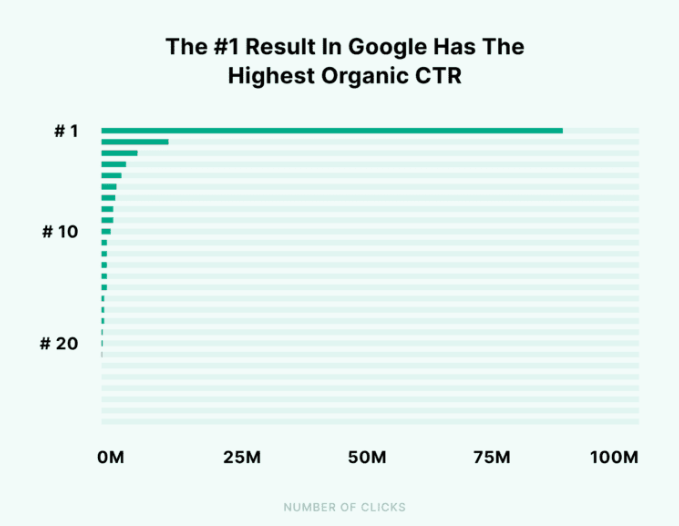
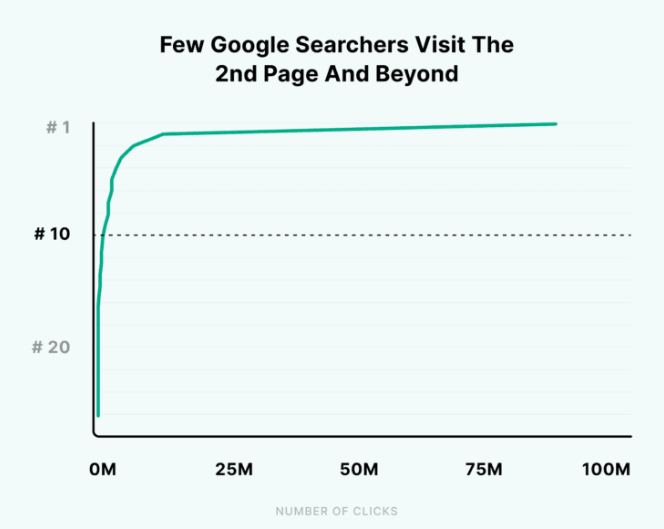
![[blog]_[ Brighton SEO April 2023: Key Takeaways]_[Blog Picture]](https://cedarwood.digital/wp-content/uploads/2023/05/Untitled-design-29-900x506.png)
![[blog]_[SEO - Five Great Features of GA4]_[Blog Picture]](https://cedarwood.digital/wp-content/uploads/2023/05/Untitled-design-30-900x506.png)


![[blog]_[BrightonSEO Review]_[Blog Picture]](https://cedarwood.digital/wp-content/uploads/2023/05/Untitled-design-31-900x506.png)
![[blog]_[BrightonSEO Review]_[Blog Picture]](https://cedarwood.digital/wp-content/uploads/2023/04/Untitled-design-32-900x506.png)
![[blog]_[Brighton SEO Deck: Using Digital PR To Enhance Your E-E-A-T Signals]_[Blog Picture]](https://cedarwood.digital/wp-content/uploads/2023/04/wpimage-id13321width562pxheightautosizeSluglargelinkDestinationnone-figure-classwp-block-image-size-large-is-resizedimg-srchttpscedarwood.digitalwp-contentuploads202507Image-1-1024x-22-1-900x506.png)

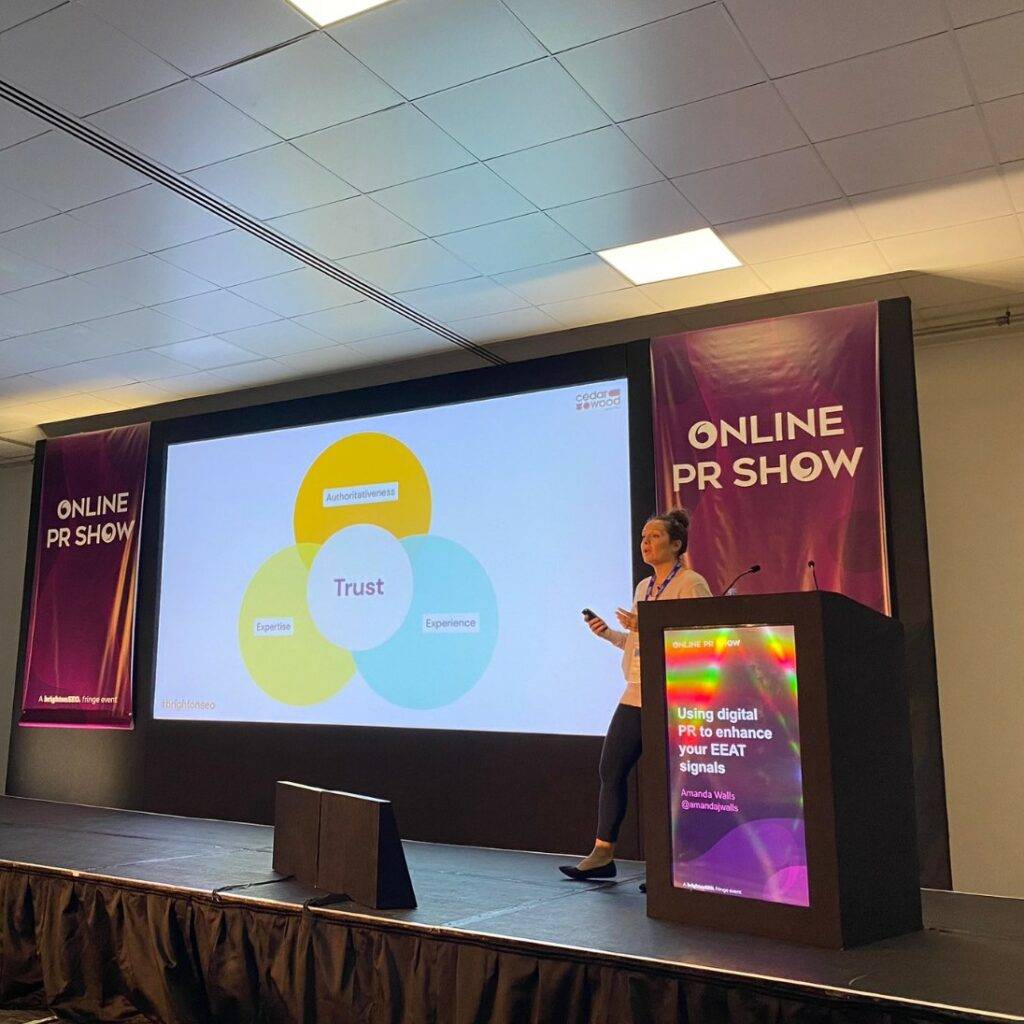
![[blog]_[Introduction To GA4 - An SEO POV]_[Blog Picture]](https://cedarwood.digital/wp-content/uploads/2023/04/Untitled-design-33-900x506.png)
![[blog]_[Creating An Effective Internal Linking Strategy For SEO]_[Blog Picture]](https://cedarwood.digital/wp-content/uploads/2023/04/Untitled-design-35-900x506.png)


![[blog]_[A Guide To Local SEO]_[Blog Picture]](https://cedarwood.digital/wp-content/uploads/2023/04/Untitled-design-36-900x506.png)
![[blog]_[Cedarwood Nominated For 12 European Search Awards]_[Blog Picture]](https://cedarwood.digital/wp-content/uploads/2023/04/wpimage-id13321width562pxheightautosizeSluglargelinkDestinationnone-figure-classwp-block-image-size-large-is-resizedimg-srchttpscedarwood.digitalwp-contentuploads202507Image-1-1024x-15-900x506.png)
![[blog]_[Digital PR: The Importance Of Deeper Page Link Building]_[Blog Picture]](https://cedarwood.digital/wp-content/uploads/2023/03/Untitled-design-68-900x506.png)